Study Method
 Blended
Start Date
 Jan 13 2022
Length of Course
 TBA
Fees
 195 per person
Location
 TBA
Creating Self Updating Grading Matrices
EXCEL FOR REWARD – MASTERCLASS #1
Creating Self Updating Grading Matrices
Part of our Excel for Reward Masterclass series: click here for more details about the five afternoon sessions.
Date: Thursday 13 January 2022
Time: 1pm to 3pm (UK)
Duration: Two hours including five-minute break at approx. 2pm
Venue: Your PC
Once your jobs have been evaluated, using either a job content or market pricing approach, your reward team and management need to audit and view the grades by grade and by function (or job family, discipline, business unit, division, area, company).
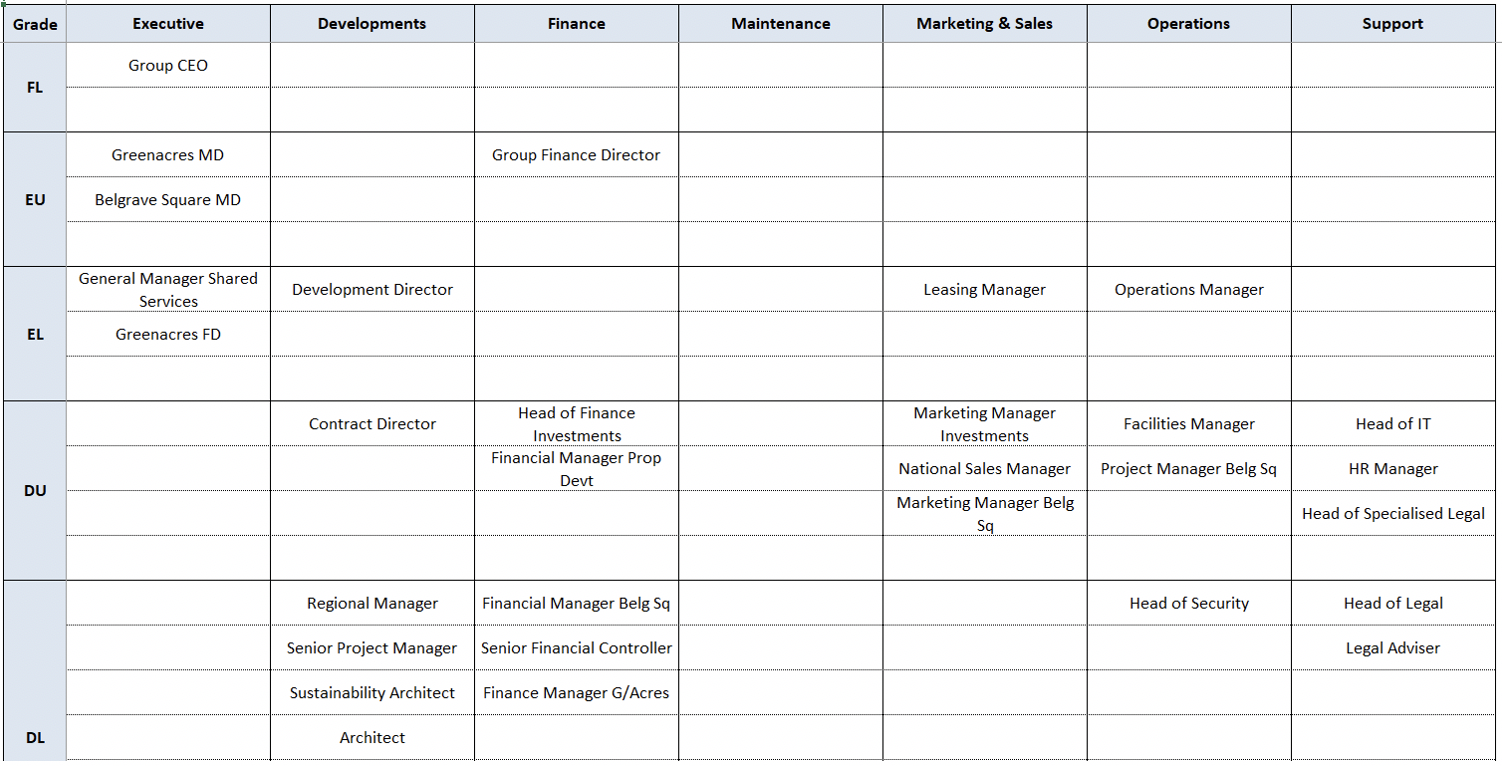
To conduct a meaningful audit, the jobs need to be in a matrix form rather than in a long list. This enables an equity / consistency check:
- horizontally – similar grades across different functions
- vertically – grade differences within each function
This matrix also presents the job grade data in a user-friendly and accessible format for viewing of grades and determining of career paths, as shown in the screenshot.
All too often, these grading matrices are high maintenance and error prone, as:
- jobs change constantly – new jobs, obsolete jobs, changes to job title or grade
- organisation structures and function names often change
- reward practitioners need to remember to update the matrix when jobs / grades / functions change
- the update is tedious and time consuming, as each job needs to be placed in the right function and grade, old jobs need to be moved or deleted, checks need to be done for duplicates
- the number of rows in the matrix constantly has to be adjusted to cater for more or less jobs in each grade; lots of blank rows left in the matrix make it difficult to read and print
During this Excel masterclass, Dianne will demonstrate how to transform this time-consuming and error-prone process into a streamlined, accurate, low-maintenance approach. She will show you how to:
- Use Power Query to create the source data for the grading matrix from payroll / HRIS data
- Create a grading matrix that updates automatically from a list of functions, jobs and grades
- Add an extra dimension / drop-down to the grading matrix, so that the organisation can have a separate grading matrix for each company, geographical area or business unit, all reading from the same list of jobs
- Record a macro that will adjust every grading matrix in the file to show the required number of rows per grade
- Update all grading matrices from payroll / HRIS data with two clicks
- Create the grading matrices using formulas (for legacy Excel users) or dynamic arrays (for Microsoft 365 users)
Attendees will be provided after the session with the Excel spreadsheets demonstrated and detailed instructions, so that they can replicate the functionality with their own grading data.
Who should attend?
Reward and HR practitioners who work with grades and would like to know how to transform data from a list to a matrix.


“Reward Blueprints: 'This report on market data is something that I wished I could have had on my desk to read when I started my career in remuneration a number of years ago.'”
“Reward Blueprints: 'The Job Evaluation Toolkit looks good. I really think that E-Reward is producing material for the practicing Reward Manager which is of true practical value. K”
“Reward Blueprints: 'They all are very interesting and informative.'”
“ Annual conference 2015: ‘An excellent range of topical topics and good/expert presenters. Very good value for the price!’”
“Excel Intermediate Nov 2015: 'Dianne was engaging and patient.'”
“Report 5, Dec 2015: 'Everyone knows that US CEOs are paid more than anyone else, but exactly how much more is a question rarely answered. In this groundbreaking report we get the ”